
Sprung zum Abschnitt


Sie können die gesuchte Antwort nicht finden? Keine Sorge, wir sind hier, um zu helfen!
Kontakt zum SupporthsbUpdater | Service Release Updater Changes
Overview
From v29.4 and v30.0 onwards, the Updater installs release versions only. |
Service releases are no longer offered through the Updater and are available exclusively through Install Specific Version.
This document describes the change, explains how to install a service release, and answers common questions.
1. Updater
The Updater keeps your installation up to date by installing the latest release version.
Note: The Updater installs release versions only.
Service releases are not offered through the Updater.
To install a service release, use Install Specific Version (see section 2).
2. Install Specific Version
1. AutoCAD® Architecture
Select the hsbcad Icon in the bottom right corner of your AutoCAD® Architecture window.
This will then open the following dialog box and you will then click the Update hsbDesign option.

2. Autodesk Revit®
Select the hsbcad Icon in the bottom right corner of your AutoCAD® Architecture window.

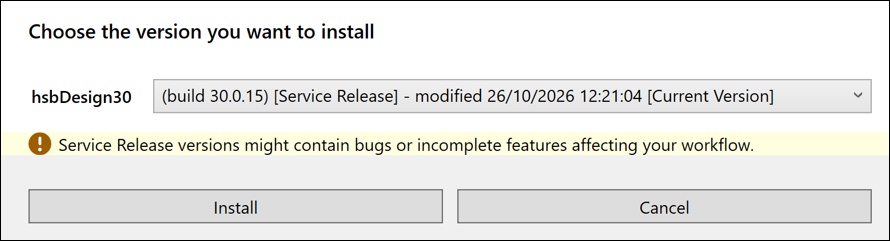
After selecting Update hsbDesign the following dialog box will show.

Use Install Specific Version to select exactly which version to install, including service releases.
Installing a service release
Service releases address specific issues and are intended for customers who require that particular fix. We recommend installing a service release only when advised by hsbcad support.
To install a servicerelease:
- Open Install Specific Version.
- Select the required service release from the list.
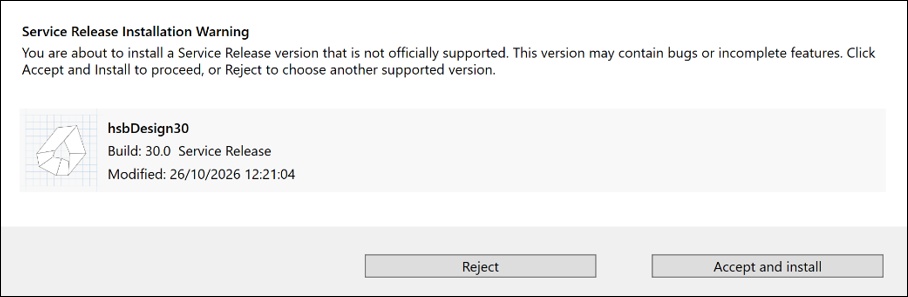
- Read the warning message and confirm to continue.
When you select aservice release, the following warning message is displayed:
3. Q&A (Frequently asked questions)
Why does theUpdater no longer show service releases?
As of v29.4 and v30.0, the Updater installs the latest release versiononly. Service releases are available through Install Specific Version.
How do I install aservice release?
Open Install Specific Version, select the service release from the list, and confirm the warning message to continue. See section 2 for step-by-step instructions.
Why is a warningdisplayed when I select a service release?
Service releases are intended for specific issues. The warning helps prevent a service release from being installed unintentionally.
Should I install aservice release?
We recommend installing a service release only when advised by hsbcad support. For general updates, use the Updater to install the latest release version.
Which versions doesthis change apply to?
This change applies from v29.4 and v30.0 onwards.
More interesting documents
hsbUpdater | Service Release Updater Changes
How to update your old hsbUpdater
How to update hsbDesign22 or older versions for AutoCAD® (Video)
How to update hsbDesign23/24/25/26/27/28/29/30 for AutoCAD®Architecture
Revit® | Update hsbDesign for Autodesk Revit®
hsbUpdater issue: Exception #1