
Jump to section


Can’t find the answer you’re looking for? Don’t worry we’re here to help!
Contact supportTSL | V28 and newer - hsbTimberPercentage - Roof
This document will show you how to calculate the wood percentage / TimberPercentage with the hsb_E-TimberPercentage and HSB_ E-TimberPercentageArea tsl for determining the RC value of elements for the BENG - NTA 8800.
BLOCK_INFO_START
To use this new tsl, 2 tsls need to be present in the Drawing. HSB_E-TimberPercentage and HSB_E-TimberPercentageArea.
Where can I find this tsls?
C:\Program Files\hsbcad\hsbDesign25\Content\Dutch\TSL\hsb_E-TimberPercentage.mcr
C:\Program Files\hsbcad\hsbDesign25\Content\Dutch\TSL\hsb_E-TimberPercentageArea.mcr
NOTE: This article is for the latest versions of the tsl. This means HSB_E-TimberPercentageArea version 4.0 and newer. This new version is available from hsbDesign version 28.
BLOCK__END
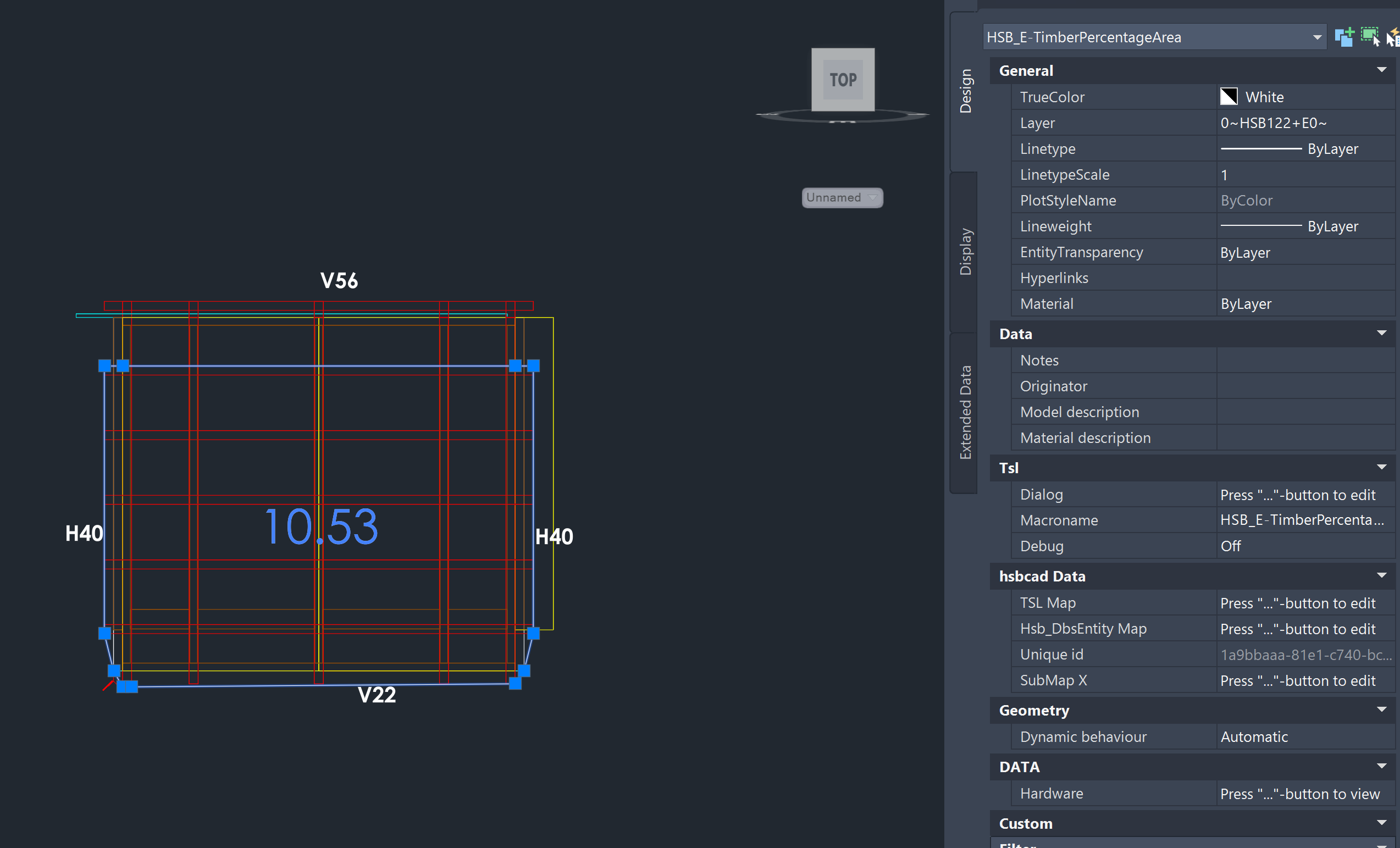
The HSB_E-TimberPercentage TSL analyses the element and inserts the HSB_E-TimberPercentageArea tsl to visualize the outline around zone 0 and takes the area of all beams within the area of the automatically placed PLine.
Beams narrower than half the element thickness are not included in the calculation.
BLOCK_WARNING_START
If you are not familiar with DSP: DO NOT TOUCH IT!!
BLOCK__END
How to use the TSL
When executing the tsl an element must be selected.If nothing is entered in the properties Profile Name(s) then the outline of zone 0 of the element will be taken.This means the outline where the openings are taken from.
See also the example below where the after inserting the HSB_E-TimberPercentage tsl, the HSB_E-TimberPercentageArea is placed on the element, the opening and outline are visualized with the selected line. In the middle of the element the TimberPercentage is shown, in this case 10.53.
Outline based on details
In the DSP Details, just like with the walls, it is imperative to introduce a cut with an underscore (_) prefixed to its name..
This can be attached to a variable in a DSP so that you can set the Profile from the parameters of the detail.

From within your detail you need to indicate where the base reference point is in your DSP..

BLOCK_WARNING_START
If you are not familiar with DSP: DO NOT TOUCH IT!!
BLOCK__END
BLOCK_INFO_START
hsbcad can help you upgrade your DSP details
BLOCK__END
BLOCK_INFO_START
The hsb_E-TimberPercentageArea TSL transmits data to the element, retrievable through the following formatting:
@(ExtendedProperties.TimberPercentage.Percentage)
@(ExtendedProperties.TimberPercentage.Area)
@(ExtendedProperties.TimberPercentage.AreaBrutto)
@(ExtendedProperties.TimberPercentage.AreaWood)
@(ExtendedProperties.TimberPercentage.Name)
BLOCK__END